
R6 Marketplace: Buy, Sell & Trade Rainbow Six Siege Items Like a Pro
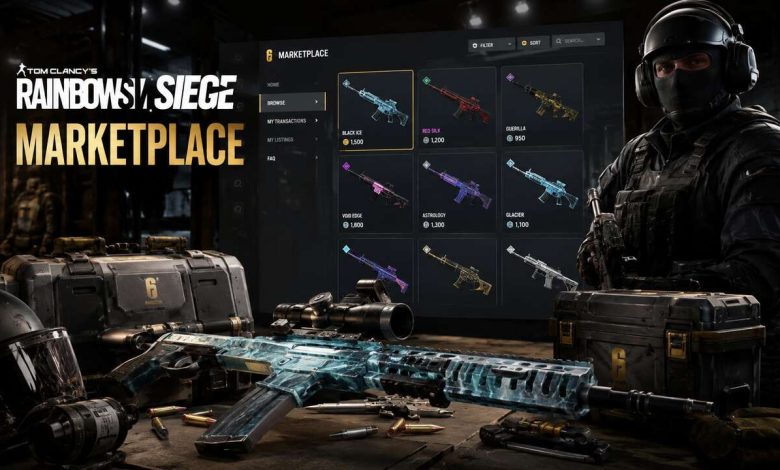
If you’ve been playing Rainbow Six Siege for a while, you already know how frustrating it used to be. You missed a limited-time event, and that Black Ice skin you wanted was simply gone forever. Or you had a pile of duplicate charms sitting in your inventory with no way to do anything useful with them. The R6 Marketplace changed all of that.
This guide covers everything you need to know from getting access and placing your first order to advanced trading tactics that turn your cosmetics into a growing credit stack. No fluff. Just actionable information you can use today.
What Is the R6 Marketplace?
The R6 Marketplace is Ubisoft’s official trading platform built directly into Rainbow Six Siege. It allows players to buy and sell eligible cosmetic items weapon skins, operator uniforms, headgear, charms, portrait cards, and attachment skins using R6 Credits as the sole currency.
The platform runs on an order book system. Buyers post the maximum price they’re willing to pay. Sellers post the minimum price they’ll accept. When those numbers match, the transaction completes automatically. There’s no direct player-to-player negotiation, which keeps things simple and scam-free.
What makes this different from the regular Ubisoft store is control. In the standard store, Ubisoft sets the price and you either pay it or walk away. On the Marketplace, price is determined entirely by supply and demand. A skin nobody wants costs almost nothing. A rare legacy item that thousands of players are chasing can command a serious premium.
The Marketplace launched in beta during Year 9 (mid-2024), was tested through a gradual rollout, and fully opened to all eligible players with the Siege X update on June 10, 2025. Since June 15, 2025, the invitation-only requirement has been removed entirely.
Who Can Use the R6 Marketplace?
Before you can buy or sell anything, you need to meet three requirements:
Clearance Level 25: This ensures you’ve spent meaningful time in the game and understand how cosmetics work. New accounts cannot access the Marketplace immediately.
Two-Factor Authentication (2FA) enabled: This is non-negotiable. Ubisoft requires 2FA on your account to protect against unauthorized access. Set this up through your Ubisoft Connect account settings before you try to access the Marketplace.
Age requirement: You must be at least 13 years old, and depending on your region, parental consent may apply.
Once those three boxes are checked, visit the official Rainbow Six Siege Marketplace through the in-game menu or directly via the Ubisoft Connect platform. Your inventory syncs automatically across PC, PlayStation, and Xbox.
Understanding R6 Credits
R6 Credits are the only currency accepted on the Marketplace. You can acquire them two ways: purchase them directly through Ubisoft for real money, or earn them by selling items on the Marketplace.
When you sell an item, Ubisoft takes a 10% fee from the transaction. The remaining 90% goes into your R6 Credit balance, which you can then spend on new purchases through the Marketplace or the regular store.
This fee structure is important to factor into your pricing. If you want to net 1,000 credits from a sale, you need to list the item at approximately 1,112 credits (1,000 divided by 0.9). Getting this math wrong is one of the most common beginner mistakes.
R6 Credits earned through the Marketplace cannot be withdrawn as real money. They stay within the Ubisoft ecosystem. This is fundamentally different from how Steam’s Community Market works, and it’s worth understanding before you start treating your inventory like an investment portfolio.
What Items Can Be Traded?
Not everything in your inventory is eligible for the Marketplace. Items must be explicitly flagged as tradable to appear in your Sell tab.
Generally tradable items include:
- Weapon skins from past seasons and battle passes (after a cooldown period)
- Legacy event cosmetics like Black Ice and Glacier bundles
- Operator uniforms from older seasons
- Charms from previous years
- Headgear from completed seasonal content
- Celebration Packs (added as tradable in 2025’s Operation High Stakes)
- Bravo Pack items and select Esports Sets via R6 SHARE
Generally not tradable:
- Items from the current active season (cooldown applies)
- Base game content included with the purchase of Siege
- Certain event exclusives tied to specific promotions
- Items acquired through Ubisoft+ subscriptions
The 15-day resale cooldown is one detail that catches many players off guard. When you receive or purchase a tradable item, you cannot list it for sale for 15 days after acquisition. Plan around this if you’re trying to flip items quickly.
How to Buy Items on the R6 Marketplace
Buying is straightforward once you understand the order system.
Open the Marketplace and go to the Buy tab. Use the search bar or category filters to find what you’re looking for. You can filter by item type (weapon skin, headgear, charm, etc.), rarity, operator, and price range.
When you find an item, you’ll see the current order book the spread between what buyers are bidding and what sellers are asking. You have two options:
Instant Buy: Purchase at the lowest active seller price right now. Immediate, but you pay the current asking price with no negotiation.
Limit Order (Buy Order): Enter the maximum price you’re willing to pay. Your order sits in the queue until a seller lists at or below your price. This takes longer but often results in a better deal.
Orders expire after 30 days if unfilled. Items purchased appear in your inventory immediately even mid-game if you’re actively playing at the time of the match.
For competitive buying, peak hours matter. Traffic is highest during evening hours in your region (roughly 6–11 PM UTC is a strong baseline), which means more listings and faster order fills. If you need something urgently, that’s the window to focus on.
How to Sell Items on the R6 Marketplace
Selling follows a similar logic but in reverse.
Go to the Sell tab. Your eligible inventory appears here items that don’t show up are either not tradable or currently within the 15-day cooldown window. Select what you want to sell.
Before setting your price, check the current order book for that item. Look at what buyers are already bidding, what sellers are currently asking, and what the recent transaction history shows. This context tells you where demand actually sits versus where sellers hope to cash out.
Set your minimum ask price the lowest amount you’ll accept. Remember to account for the 10% fee when deciding on your number. Once listed, your item is reserved (it won’t be visible in your inventory for personal use), but you can cancel the listing at any time before it sells.
When a buyer’s bid matches your ask, the transaction completes automatically. The credits (minus fee) land in your balance.
If your listing hasn’t moved after 24 hours, consider whether your price is competitive. A 2–3% reduction often restores momentum without significantly cutting into your profit.
Trading Rules, Limits, and Fees
The Marketplace has structural limits that every trader needs to know:
- Active buy orders: 5 at a time
- Active sell orders: 5 at a time
- Daily transaction completions: 20 per day
- Order expiry: 30 days
- Item resale cooldown: 15 days after acquisition
- Seller fee: 10% per transaction (no fee for buyers)
These limits matter if you’re doing high-volume trading. Once you hit 20 daily completions, new matches won’t process until the next day. Volume traders should diversify into higher-value items rather than chasing small gains across dozens of transactions.
Violating the Terms of Use including attempts to manipulate pricing or exploit the system can result in temporary or permanent suspension. Cross-region trading is allowed as long as it complies with Ubisoft’s policies.
Pricing Strategy: How to Set the Right Price
This is where most casual traders leave money on the table, and where serious traders gain their edge.
For common items (charms, basic headgear): Price near the current floor the lowest active asking price. Buyers are price-sensitive for common items. Being 5% cheaper than the competition moves your listing fast. Volume matters more than margin here.
For mid-tier items: Check the 7-day average price from a tracker like Stats.cc or Siege.gg. Listing 5–8% above the average is reasonable if demand has been steady. If supply is thin, you can push higher. If there’s a stack of identical listings, you’ll need to undercut slightly to stand out.
For rare legacy items (Black Ice, Glacier bundles, Pro League sets): These have inelastic demand buyers want them specifically and are less price-sensitive. Research recent transaction prices carefully, not just current asks. Price with confidence, but don’t anchor to wishful thinking. A listing that sits for three weeks isn’t a win.
One practical formula: check the last 5 completed sales for your item. Take the average. List at that average or 3–5% above it. Adjust based on how many competing listings exist.
Advanced Trading: Flipping for Profit
Flipping is buying items below their fair value and relisting at a higher price. Done well, it compounds your R6 Credits over time. Done carelessly, it ties up your balance in stalled inventory.
Seasonal arbitrage: Is the most reliable flip. Prices for event cosmetics tend to dip after the initial hype fades, then spike again when the next event season approaches or when content creators spotlight specific skins. Buying during the dip and selling into renewed interest captures that spread.
Liquidity trading: Works differently. You focus on high-volume items that trade frequently charms in the 15–30 credit range, common headgear, basic uniforms. Margins are small (10–15%), but orders fill quickly. The compounding effect across many small transactions adds up.
Order book positioning: Is a more active technique. When you see a significant gap between the highest buyer bid and lowest seller ask, there’s room to place a buy order above the current high bid and a sell order below the current low ask. You’re playing the spread. This requires monitoring and willingness to cancel and reposition when the market moves.
A few rules that prevent costly mistakes: never put more than 20–25% of your credit balance into a single item, always account for the 10% fee in your ROI calculation, and treat the 15-day resale cooldown as dead time when planning your position.
Tools That Give You an Edge
Trading without data is guessing. These resources make you more accurate:
Stats.cc: Tracks live Marketplace prices, 7-day and 30-day averages, transaction volumes, and price history for individual items. Essential for mid-tier and rare item trading.
Siege.gg: Broad game analytics including item data and some Marketplace price tracking. Good for cross-referencing.
Discord communities: Several R6 trading servers share real-time price alerts and discuss emerging trends. Finding one active community is worth more than any single tool.
Google Sheets tracking: Build your own spreadsheet to log every buy, sell, and fee. Knowing your actual ROI not estimated is how you improve over time. Track: item name, buy price, sell price, fee paid, net profit, days held.
Common Mistakes and How to Avoid Them
Ignoring the fee math. Listing at your target price means you net 10% less than expected. Always calculate your ask using the formula: Desired Net / 0.9 = Listing Price.
Panic selling during dips. Price dips are normal, especially right after events end. Selling immediately into a dip locks in a loss. If the item has genuine long-term demand, patience usually recovers the value.
Buying hype peaks. The worst time to buy a trending item is when it’s already trending. By the time something is widely discussed on Reddit or in Discord, the price often already reflects that attention. Get ahead of cycles, not behind them.
Spreading credits too thin. Having 15 active positions across low-value items feels productive but is hard to manage and slow to compound. Fewer, better-researched positions with higher individual value tend to outperform.
Ignoring the resale cooldown. If you buy an item planning to flip it in three days and it has a 15-day cooldown, that plan fails. Always confirm tradability and cooldown status before purchasing with flip intent.
Best Items to Focus On Right Now
Item-specific recommendations shift with each season and community trends, but the categories that consistently produce results are:
Black Ice weapon skins: Perennial demand. These were the original prestige items in Siege and never fully go out of style. Price floors are relatively stable with periodic spikes.
Glacier cosmetics: Legacy status. Players who missed the original run continue to seek these, which keeps demand steady even years later.
Pro League and Esports Sets: Limited production, genuine collector appeal. Prices trend upward over time as supply shrinks and new players discover them.
Seasonal charm collections: Lower value individually, but high velocity. Good for liquidity trading without large credit commitment.
Twitch drop items: After drop campaigns end, these become Marketplace-only acquisitions. Early post-campaign listings often carry a premium before supply normalizes.
Use price trackers weekly rather than daily. Marketplace trends move on a scale of days to weeks, not hours, unless a major update or content announcement triggers sudden movement.
Frequently Asked Questions: R6 Marketplace
Can I use the R6 Marketplace on console? Yes. The Marketplace is accessible via Ubisoft Connect across PC, PlayStation, and Xbox. Your inventory syncs automatically across platforms.
What happens if my buy order doesn’t fill in 30 days? It expires automatically. Your reserved credits are returned to your balance and you can place a new order.
Can I sell items I bought from the regular Ubisoft store? Some items purchased from the store are tradable after the 15-day resale cooldown. Others are permanently non-tradable. Check the item’s eligibility in your inventory.
Is there a way to trade directly with another player? No. The Marketplace does not support direct player-to-player trades. All transactions go through the order book system. This is intentional it prevents scams and price manipulation.
Why isn’t my item showing up in the Sell tab? The most common reasons are: the item is not Marketplace-eligible, it’s within the 15-day resale cooldown, or it was acquired through a non-tradable source (subscription, base game content, certain event rewards).
For More Informational Blogs Visit Here
Final Thoughts
The R6 Marketplace is the most significant quality-of-life improvement Siege has seen in years. For casual players, it means you can finally get that skin you missed without relying on luck or paying inflated prices to shady third-party sites. For active traders, it’s a genuine economy with real strategy involved.
Start simple. Sell a few things you don’t need, understand how orders work, and get comfortable reading the order book. Once that becomes second nature, layer in pricing research and eventually active flipping strategies. The players who profit consistently aren’t smarter they’re more patient and more systematic.